Материал: Панель АСКВ2 7016480
Software-specific information • OPC UA server • Description of the nodes of the information model
6.7.2.5 Additional device properties
The following device properties are not available within group Identification .
Path to the object directory:
Path:
0:Root/0:Objects/2:DeviceSet/4:PowerPanel T50
ns |
BrowseName of the information |
Description |
2 |
Manufacturer |
Manufacturer of the device: B&R Industrial Automation GmbH |
2 |
DeviceManual |
Link to the website: The user's manual is located in the Downloads section. |
6.7.2.5.1  Manufacturer
Manufacturer of the device: B&R Industrial Automation GmbH
Path to the node (BrowsePath)
Path:
0:Root/0:Objects/2:DeviceSet/4:PowerPanel T50 /2:Manufacturer
Device property Manufacturer is only available as a property of node PowerPanel T50 .
Node attribute
NodeClass |
Variable |
DataType |
String |
AccessLevel |
CurrentRead |
UserAccessLevel |
CurrentRead |
6.7.2.5.2  DeviceManual
Link to the website: The user's manual is located in the Downloads section.
Path to the node (BrowsePath)
Path:
0:Root/0:Objects/2:DeviceSet/4:PowerPanel T50 /2:DeviceManual
Device property CompatibilityId is only available as a property of node PowerPanel T50 .
Node attribute
NodeClass |
Variable |
DataType |
String |
AccessLevel |
CurrentRead |
UserAccessLevel |
CurrentRead |
106 |
Power Panel T50 User's manual V1.22 - Translation of the original documentation |
Maintenance
7 Maintenance
7.1 Cleaning
Danger!
Power Panel devices are only permitted to be cleaned while switched off in order to prevent unintended functions from being triggered when handling the touch screen or pressing keys.
Power Panel devices should be cleaned with a moist cloth. The cloth should be moistened with water and detergent, a screen cleaning agent or alcohol (ethanol). The cleaning agent should be applied to the cloth beforehand, not sprayed directly on the Power Panel! Never use aggressive solvents, chemicals, scouring agents, pressurized air or steam-jet air ejectors.
Important!
Cleaning the label on the back of the unit is only permitted with a dry cloth. This ensures readability of the thermal print during the service life of the device.
Information:
The display with the touch screen should be cleaned at regular intervals.
Power Panel T50 User's manual V1.22 - Translation of the original documentation |
107 |

Maintenance
7.2 User tips for increasing the service life of the display
Pixel errors
Information:
Displays may contain defective pixels (pixel errors) that result from the manufacturing process. They are not grounds for initiating a complaint or warranty claim.
7.2.1 Backlight
The service life of the backlight is specified by its "half-brightness time". An operating time of 50,000 would mean that the display would still retain 50% of its brightness after this time.
How can the service life of backlights be extended?
•Setting the display brightness to the lowest value that is still comfortable for the eyes
•Using dark images
•Reducing the brightness by 50% can increase the half-brightness time by approximately 50%.
7.2.2Image persistence
Image persistence refers to the "burning in" of a static image on a display after being displayed for a prolonged period of time. This not only occurs with static images, however. Image persistence is also referred to in the technical literature as burn-in effect, image retention, memory effect, memory sticking or ghost image.
There are basically 2 types:
•Area type: This type is characterized by a dark gray image. The effect disappears if the display is switched off for a long period of time.
•Line type: Can result in permanent damage.
What causes image persistence?
•Static images
•No screensaver
•Sharp transitions in contrast (e.g. black/white)
•High ambient temperatures
•Operation outside of specifications
How can image persistence be reduced?
•Constantly switching between static and dynamic images
•Avoiding excessive brightness differences between foreground and background elements
•Using colors with similar brightness
•Using complementary colors in consecutive images
•Using screensavers
108 |
Power Panel T50 User's manual V1.22 - Translation of the original documentation |

Accessories
8 Accessories
8.1 Overview
Model number |
Product ID |
Page |
Cage clamp terminal |
block |
|
0TB6102.2110-01 |
Accessory 2-pin cage clamp terminal block (3.81) |
110 |
Screw clamp terminal |
block |
|
0TB6102.2010-01 |
Accessory 2-pin screw clamp (3.81) |
110 |
USB accessories |
|
|
5MMUSB.2048-01 |
USB 2.0 flash drive, 2048 MB, B&R |
110 |
5MMUSB.4096-01 |
USB 2.0 flash drive, 4096 MB, B&R |
|
Ethernet cable 1) RJ45 |
to RJ45 |
|
X20CA0E61.00020 |
POWERLINK connection cable, RJ45 to RJ45, 0.20 m |
110 |
X20CA0E61.00025 |
POWERLINK connection cable, RJ45 to RJ45, 0.25 m |
|
X20CA0E61.00030 |
POWERLINK connection cable, RJ45 to RJ45, 0.30 m |
|
X20CA0E61.00035 |
POWERLINK connection cable, RJ45 to RJ45, 0.35 m |
|
X20CA0E61.00040 |
POWERLINK connection cable, RJ45 to RJ45, 0.40 m |
|
X20CA0E61.00050 |
POWERLINK connection cable, RJ45 to RJ45, 0.50 m |
|
X20CA0E61.00100 |
POWERLINK connection cable, RJ45 to RJ45, 1 m |
|
X20CA0E61.00150 |
POWERLINK connection cable, RJ45 to RJ45, 1.50 m |
|
X20CA0E61.00200 |
POWERLINK connection cable, RJ45 to RJ45, 2 m |
|
X20CA0E61.00300 |
POWERLINK connection cable, RJ45 to RJ45, 3 m |
|
X20CA0E61.00500 |
POWERLINK connection cable, RJ45 to RJ45, 5 m |
|
X20CA0E61.00800 |
POWERLINK connection cable, RJ45 to RJ45, 8 m |
|
X20CA0E61.01000 |
POWERLINK connection cable, RJ45 to RJ45, 10 m |
|
X20CA0E61.01200 |
POWERLINK connection cable, RJ45 to RJ45, 12 m |
|
X20CA0E61.01500 |
POWERLINK connection cable, RJ45 to RJ45, 15 m |
|
X20CA0E61.02000 |
POWERLINK connection cable, RJ45 to RJ45, 20 m |
|
X20CA0E61.0300 2) |
POWERLINK connection cable, RJ45 to RJ45, 30 m |
|
X20CA0E61.0500 2) |
POWERLINK connection cable, RJ45 to RJ45, 50 m |
|
X20CA0E61.0600 2) |
POWERLINK connection cable, RJ45 to RJ45, 60 m |
|
Ethernet cable 1) 2) RJ45 to RJ45, can be used in cable drag chains |
|
|
X20CA3E61.0100 |
POWERLINK connection cable, RJ45 to RJ45, can be used in drag chains, 10 m |
110 |
X20CA3E61.0150 |
POWERLINK connection cable, RJ45 to RJ45, can be used in drag chains, 15 m |
|
X20CA3E61.0200 |
POWERLINK connection cable, RJ45 to RJ45, can be used in drag chains, 20 m |
|
1)B&R POWERLINK cables can be used for the Ethernet connections.
2)These cables are suitable for networks with transfer rates up to 100 Mbit/s, but not for Gigabit networks.
Power Panel T50 User's manual V1.22 - Translation of the original documentation |
109 |
Accessories
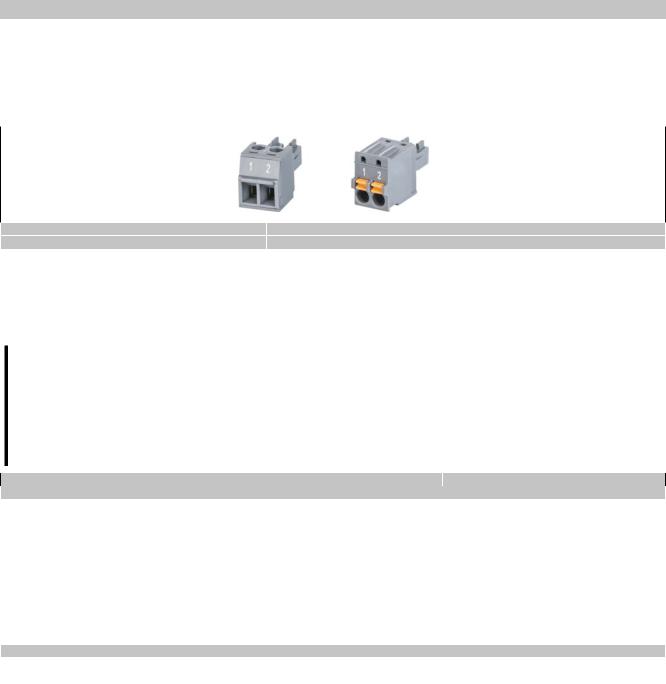
8.2 TB6102 2-pin power supply connector
This 1-row 2-pin terminal block is used to connect the power supply.
8.2.1 Order data
Model number |
Short description |
|
Terminal blocks |
0TB6102.2010-01 |
Accessory terminal block, 2-pin (3.81), screw clamp terminal block 1.5 mm² |
0TB6102.2110-01 |
Accessory terminal block, 2-pin (3.81), cage clamp terminal block 1.5 mm² |
Table 4: 0TB6102.2010-01, 0TB6102.2110-01 - Order data
8.2.2 Technical data
Information:
The following specifications, properties and limit values apply only to this accessory and may deviate from those that apply to the complete system. The data specifications for the complete system take precedence over those of individual components.
The technical data in this manual is current as of its creation/publication. We reserve the right to make changes.
Model number |
0TB6102.2010-01 |
0TB6102.2110-01 |
Terminal block |
|
|
Number of pins |
|
2 (female) |
Type of terminal block |
Screw clamp terminal block |
Cage clamp terminal block |
Cable type |
Only copper wires (no aluminum wires!) |
|
Spacing |
|
3.81 mm |
Connection cross section |
|
|
AWG wire |
|
28 to 16 |
Wire end sleeves with plastic covering |
|
0.25 to 0.5 mm² |
With wire end sleeves |
|
0.25 to 1.5 mm² |
Flexible |
|
0.14 to 1.5 mm² |
Inflexible |
|
0.14 to 1.5 mm² |
Tightening torque |
0.22 to 0.25 Nm |
- |
Electrical characteristics |
|
|
Nominal voltage |
|
300 V |
Nominal current 1) |
|
8 A |
Table 5: 0TB6102.2010-01, 0TB6102.2110-01 - Technical data
1)The limit data for each Power Panel must be taken into consideration.
8.3 Data storage devices
For technical data and additional information about data storage devices, see the corresponding documentation. This can be located and downloaded by searching for the data storage device's model number at www.br-automa- tion.com.
8.4 Cable accessories
For technical data and additional information about cables, see the corresponding documentation. This can be located and downloaded by searching for the cable's model number on the B&R website at www.br-automation.com.
110 |
Power Panel T50 User's manual V1.22 - Translation of the original documentation |