Материал: Панель АСКВ2 7016480
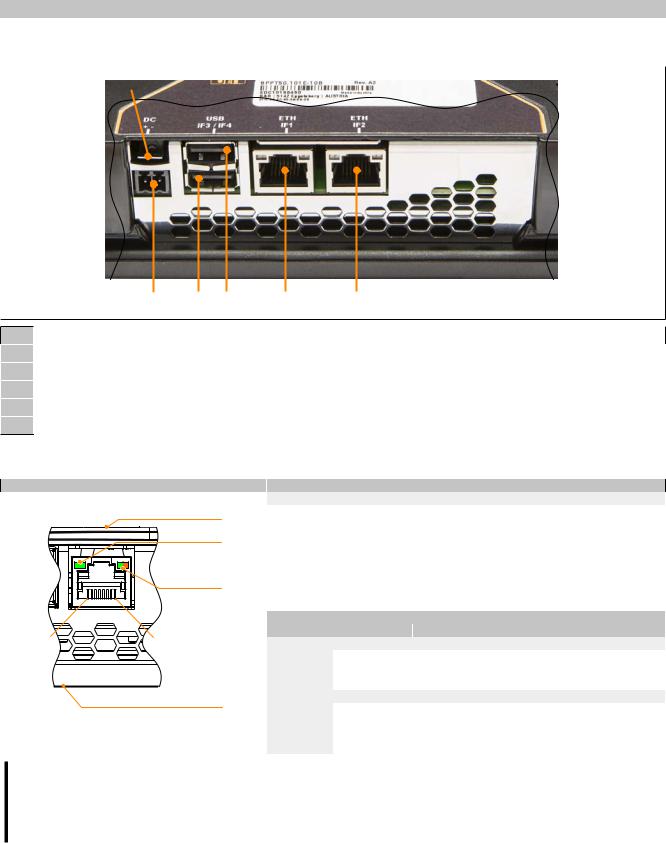
Device description • Connection elements • Ethernet interface
3.8 Connection elements
|
|
|
|
|
1 |
Grounding clip |
|
|
|
2 |
Power supply |
|
|
|
3 |
USB interface IF3 |
|
|
|
4 |
USB interface IF4 |
|
|
|
5 |
Ethernet interface IF1 |
|
|
|
6 |
Ethernet interface IF2 (depending on Power Panel variant) |
|||
3.8.1 Ethernet interface
|
Figure |
Terminal |
Ethernet |
|
Pinout |
|
|
|
|
||
|
Back |
1 |
D1+ |
Data 1+ |
|
|
LNK/ACT |
2 |
D1- |
Data 1- |
|
|
3 |
D2+ |
Data 2+ |
|
|
|
|
4 |
D3+ |
Data 3+ |
|
|
|
5 |
D3- |
Data 3- |
|
|
SPEED |
6 |
D2- |
Data 2- |
|
|
|
7 |
D4+ |
Data 4+ |
|
|
|
8 |
D4- |
Data 4- |
|
|
|
|
|
Diagnostic LEDs |
|
8 |
1 |
LED |
Color |
Status |
Description |
SPEED |
Transfer rate |
|
|
||
|
|
|
Orange |
On |
1000 Mbit/s |
|
|
|
Green |
On |
100 Mbit/s |
|
|
|
Orange + Green |
Off |
10 Mbit/s |
|
Front (touch screen) |
LNK/ACT |
Link/Activity |
|
|
|
|
Green |
On |
Link established to Ethernet network. |
|
|
|
|
|||
Shielded RJ45 |
Blinking |
Link established to Ethernet network and Eth- |
(10BASE-T/100BASE-TX/1000BASE-T) |
|
ernet activity taking place on bus. |
|
Off |
No link established to Ethernet network. |
Danger!
External circuits connected to the device must be electrically isolated from the low voltage mains or from lethal voltages using reinforced or double insulation and must meet the requirements for SELV/ PELV circuits.
36 |
Power Panel T50 User's manual V1.22 - Translation of the original documentation |
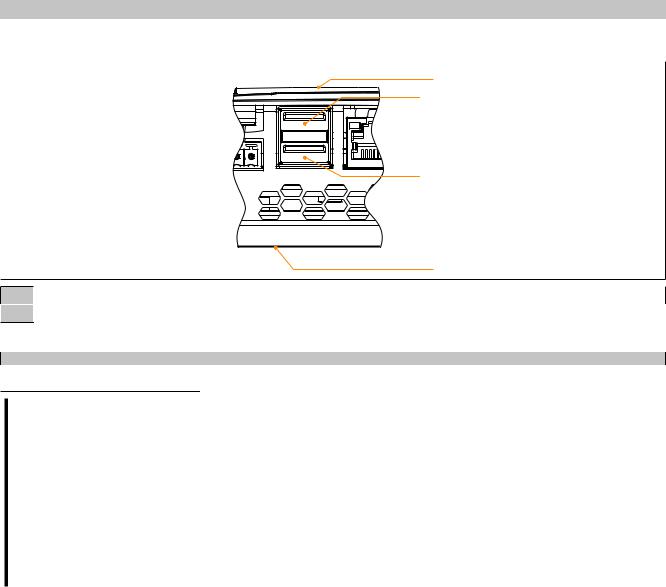
Device description • Connection elements • USB interfaces
3.8.2 USB interfaces
Back
Front (touch screen)
1USB interface IF3
2USB interface IF4
The Power Panel is equipped with a USB 2.0 host controller with 2 USB interfaces.
|
USB interface |
Transfer rate |
Low speed (1.5 Mbit/s), full speed (12 Mbit/s), high speed (480 Mbit/s) |
Power supply |
Max. 0.5 A per interface |
Important!
Possible damage to USB interfaces or USB devices!
•Peripheral USB devices can be connected to the USB interfaces. Due to the large number of USB devices available on the market, B&R cannot guarantee their functionality. Functionality is ensured when using the USB devices available from B&R.
•Because of general PC specifications these USB interfaces should be handled with extreme care with regard to EMC, location of cables, etc.
•The device is only permitted to be operated if properly grounded (see "Grounding (functional ground)" on page 42).
Power Panel T50 User's manual V1.22 - Translation of the original documentation |
37 |
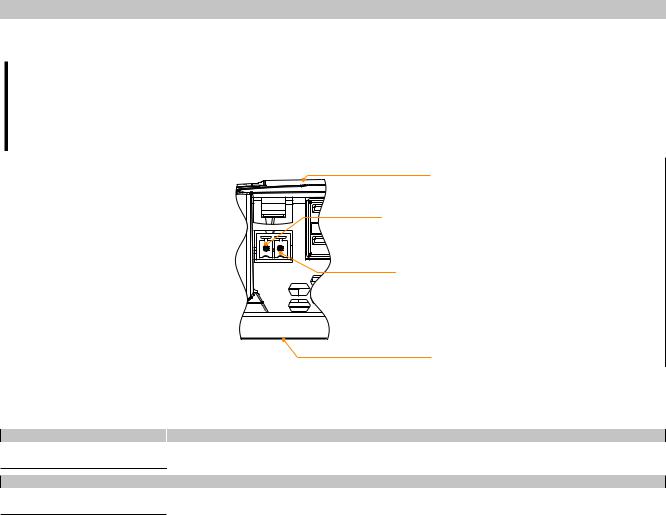
Device description • Connection elements • Power supply
3.8.3 Power supply
Danger!
This device is only permitted to be supplied with protective extra-low voltage (PELV).
Protective earth (grounding clip on the device) and the GND connection of the power supply are connected internally in the Power Panel.
Back
Front (touch screen)
The pinout for the power supply is listed in the following table and printed on the back of the Power Panel. The Power Panel has reverse polarity protection that prevents the supply voltage from being connected incorrectly and damaging the device.
Terminal |
Assignment |
Explanation |
1 |
+ |
24 VDC |
2 |
− |
GND |
Required accessories |
|
0TB6102.2010-01 |
Accessory terminal block, 2-pin (3.81), screw clamp terminal block 1.5 mm² |
0TB6102.2110-01 |
Accessory terminal block, 2-pin (3.81), cage clamp terminal block 1.5 mm² |
The supply voltage is protected internally by a soldered fuse (see technical data) against overload. The device must be sent to B&R for repairs if the fuse is destroyed in the event of error (fuse replacement).
38 |
Power Panel T50 User's manual V1.22 - Translation of the original documentation |
Commissioning
4 Commissioning
4.1 Installation
Important!
Possible damage to device!
•Commissioning and maintenance work is only permitted to be performed when the power is switched off. The power cable must also be disconnected from the power supply and device.
•Do not use force! Handle all the modules and components carefully.
•All covers, components, accessories, hardware and cables must be installed or connected before the device can be connected to the power supply and switched on.
•Observe the ESD notes (see "Protection against electrostatic discharge" on page 7).
Important installation information
•The environmental conditions must be observed.
•The device must be installed on a flat, clean and burr-free surface.
•When connecting cables, the bend radius must be taken into account.
•The device must be installed such that viewing is optimized for the user (see the technical data for information regarding the viewing angle).
4.1.1Installation cutout requirements
When installing the Power Panel, it is important to ensure that the surface and wall thickness of the installation cutout meet the following conditions:
Properties of the installation cutout |
Value |
|
Permissible deviation from the evenness |
≤0.5 mm |
|
Note: This condition must also be met with a built-in device. |
||
|
||
Permitted surface roughness in the area of the seal |
≤120 µm (R z 120) |
|
Min. wall thickness |
2 mm |
|
Max. wall thickness |
6 mm |
Important!
The degree of protection provided by the device (see technical data) can only be maintained if it is installed in an appropriate housing that has the same degree of protection and in accordance with the above requirements.
The device must ultimately be installed in a protective housing with sufficient rigidity (per UL61010-1 and UL61010-2-201).
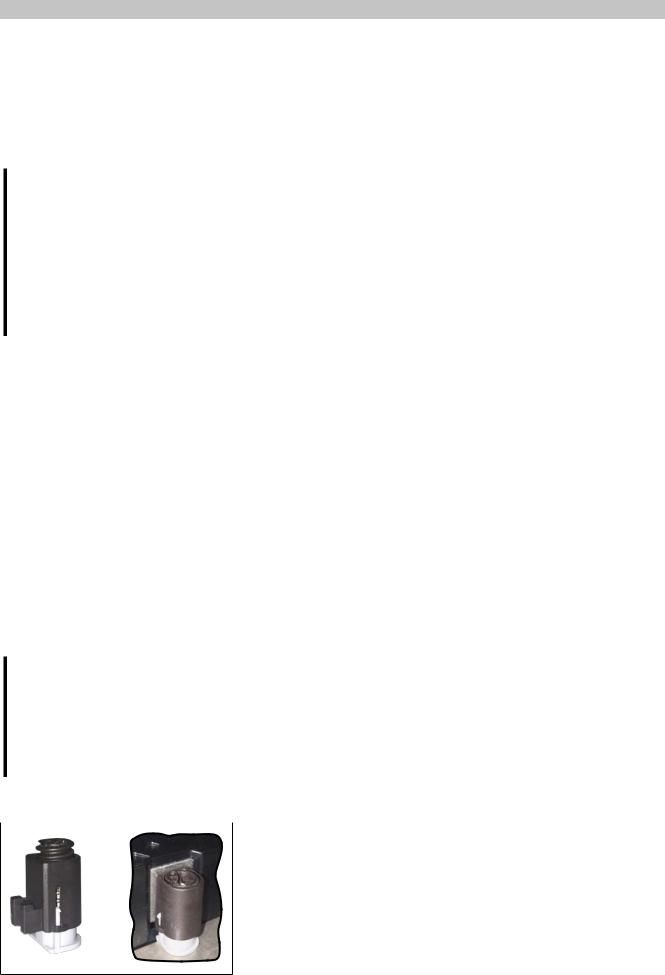
4.1.2 Mounting with retaining clips
The retaining clips are designed for a certain thickness of the material to be clamped (max. 6 mm, min. 2 mm).
A large flat-blade screwdriver is needed to tighten and remove the screws.
Devices must be installed on a flat, clean and burr-free surface; tightening screws on an uneven area can result in damage to the display or the ingress of dust and water.
See also "Installation cutout requirements" on page 39.
Figure: Retaining clip
Power Panel T50 User's manual V1.22 - Translation of the original documentation |
39 |
Commissioning
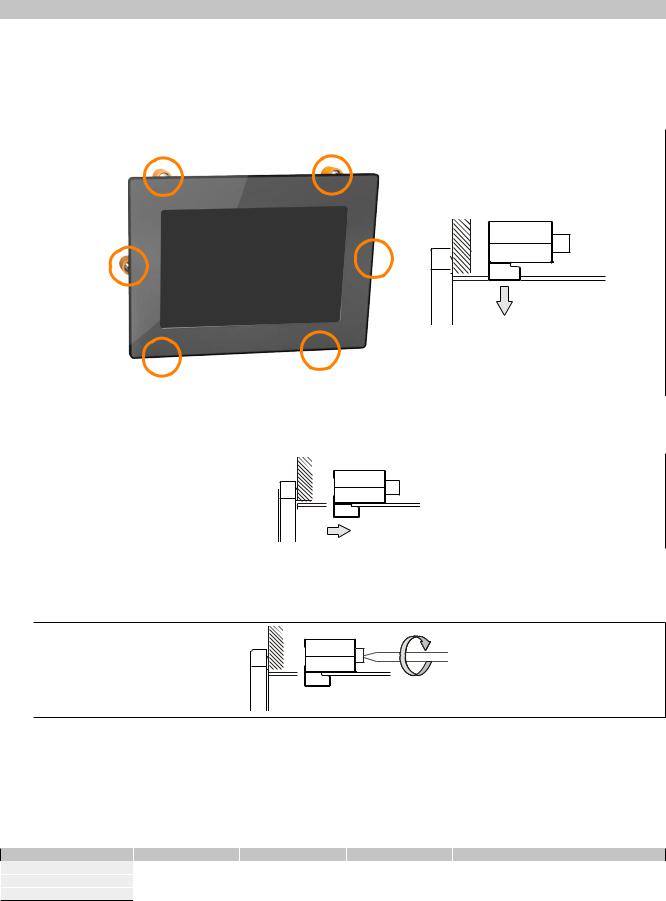
Procedure
1.Insert the device into the front of the prepared, burr-free and flat installation cutout. For the dimensions of the installation cutout, see section "Dimensions" for the individual devices.
2.Install the retaining clips on the device. To do this, insert the clips into the openings on the sides of the device (indicated by the orange circles). The number of openings may vary depending on the size of the device.
Figure: Using the retaining clips
3. Slide the retaining clips all the way to the back of the openings.
Figure: Sliding the retaining clips back
4.Now secure the retaining clips to the wall or control cabinet by tightening the screws with a flat-blade screwdriver.
Figure: Securing the retaining clips
Torque limiting is built into the retaining clips.
Tightening torque of first device generation
Retaining clips without torque limiting are used in the first device generation. These must be secured with a max. tightening torque of 0.4 Nm.
Model number |
6PPT50.0502-xxx |
6PPT50.0702-xxx |
6PPT50.101E-xxx |
6PPT50.121E-xxx |
6PPT50.156B-xxx |
Panel size |
5.0" |
7.0" |
10.1" |
12.1" |
15.6" |
1st device generation |
<C0 |
<D0 |
<D0 |
<C0 |
<C0 |
2nd device generation |
≥C0 |
≥D0 |
≥D0 |
≥C0 |
≥C0 |
40 |
Power Panel T50 User's manual V1.22 - Translation of the original documentation |