Материал: Панель АСКВ2 7016480
Configuration • Service pages
5.1.11.1 Configuring the update server
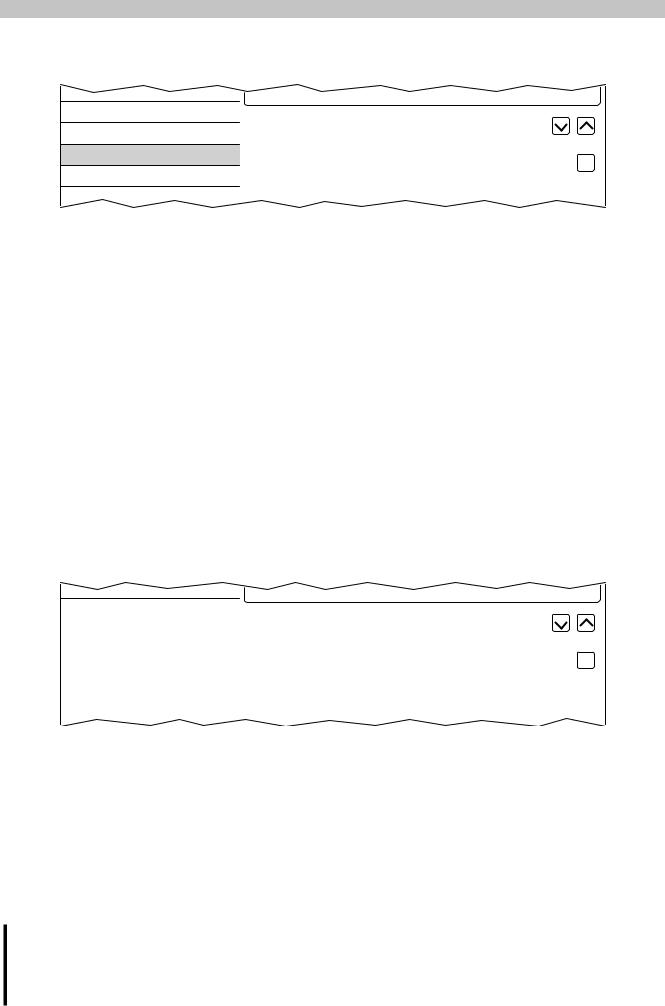
The following figure shows the default settings for configuring the update server on the Update service page:
Web |
Update server type |
TFTP |
|
|
|||
Storage |
Specify the update server type |
||
|
|||
Update |
Get Update Server from DHCP server |
||
Backup & Reset |
|
||
Security |
|
|
Update server type
Default setting: TFTP
The following settings are possible:
TFTP |
TFTP (Trivial File Transfer Protocol) is a very simple data transfer protocol. |
FTP1) |
FTP (File Transfer Protocol) offers more possibilities than TFTP. |
1)The update server type FTP is only available for devices with hardware revision C0 and later.
Get Update Server from DHCP server
Default setting: Enabled
All information required by the update server for the configured type is requested from the DHCP server. This corresponds to the information that must be entered manually if the option is disabled (see the following two sections "Configuring a TFTP or FTP update server").
If the option is disabled, one or more additional input fields are displayed depending on the selected update server type. They are described in the following two sections:
5.1.11.1.1 Configuring an TFTP update server
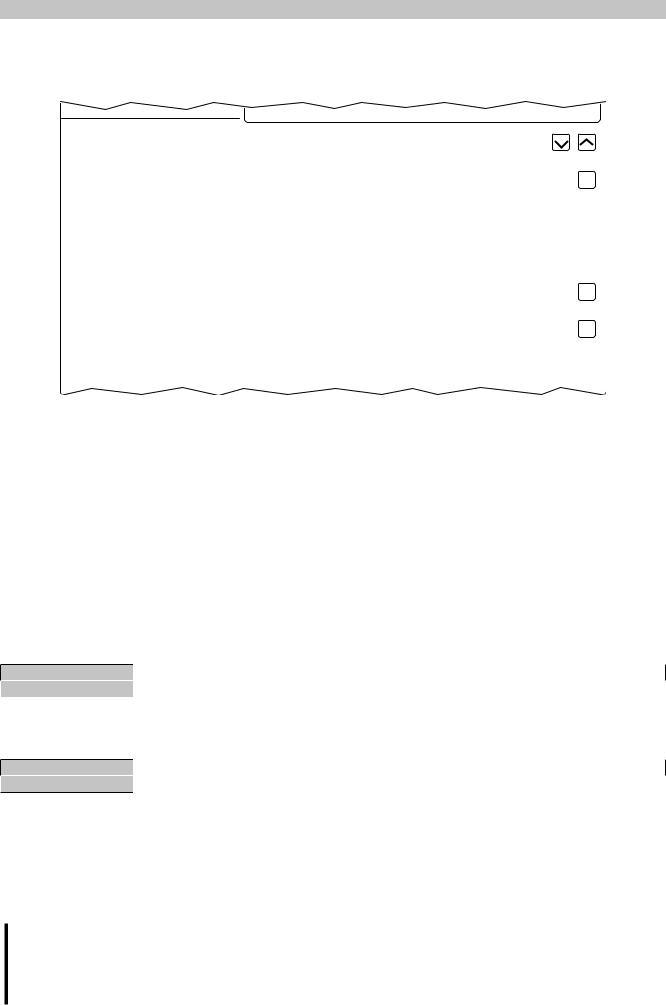
If option Get Update Server from DHCP server is disabled and update server type TFTP is selected, then input field Hostname / IP address is also displayed:
Web |
Update server type |
TFTP |
|
|
|||
Storage |
Specify the update server type |
||
|
|||
|
|
|
|
Update |
Get Update Server from DHCP server |
|
|
Backup & Reset |
|
|
|
|
Hostname / IP address |
|
|
Security |
|
||
|
|
|
|
OPC UA |
|
|
|
|
|
|
Hostname / IP address
Default setting: EMPTY (no update server entered)
To update a Power Panel from a TFTP server, a hostname or IP address for the TFTP server must be specified. By default, port 69 is used for the connection to the TFTP server.
If the TFTP server makes its services available on a different port, the port must be specified explicitly together with the IP address or hostname:
Syntax |
Example |
Description |
IP address:Port |
10.23.20.38:1069 |
A connection to IP address 10.23.20.38 is established on port 1069. |
Hostname:Port |
tftp server:1169 |
A connection to the host tftp-server is established on port 1169. |
Information:
If the specified IP address is incomplete or a TFTP server does not exist for the IP address or the specified hostname, a message is output indicating that a network connection could not be established when attempting to connect fails during the update procedure.
66 |
Power Panel T50 User's manual V1.22 - Translation of the original documentation |
Configuration • Service pages
5.1.11.1.2 Configuring an FTP update server
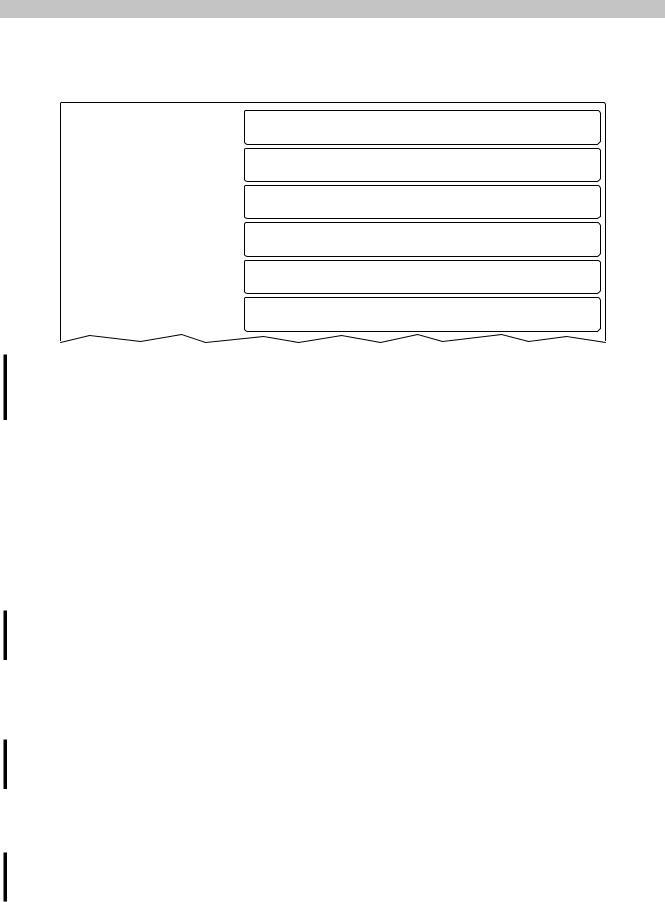
If option Get Update Server from DHCP server is disabled and update server type FTP is selected, then the following input fields are also displayed:
Web |
Update server type |
FTP |
||
|
||||
Storage |
Specify the update server type |
|||
|
|
|||
|
|
|
|
|
Update |
Get Update Server from DHCP server |
|
|
|
Backup & Reset |
|
|
|
|
|
FTP user |
|
|
|
Security |
|
|
||
|
|
|
|
|
OPC UA |
FTP password |
|
|
|
|
●●●●●●●● |
|
||
Save & Exit |
|
|||
Max. 100 characters |
|
|||
|
||||
About & Info |
Show password |
|
|
|
|
|
|||
|
Encrypt password |
|||
|
Save ftp password encrypted |
|
|
|
|
Hostname / IP address |
|
|
|
|
|
|
|
|
FTP user
Default setting: EMPTY (no username entered)
To access an update server of type FTP, an FTP username must be entered here.
FTP password
Default setting: EMPTY (no password entered)
Entry range: Max. 100 characters
To access an update server of type FTP, an FTP password must be entered here.
The FTP password is stored in configuration file PPT50Config.xml on the device.
Show password
Default setting: Disabled
Enabled |
The password is shown in the entry field as plain text. |
Disabled |
The password is hidden in the entry field using placeholder characters (●●●●●●). |
Encrypt password
Default setting: Enabled
Enabled |
The password is stored on the device in encrypted form. |
Disabled |
The password is stored on the device as plain text. |
Hostname / IP address
Default setting: EMPTY (no update server entered)
To update a Power Panel from an FTP server, a hostname or IP address for the FTP server must be specified. The FTP connection is generally established via standard port 21 on the FTP server.
It is not possible to enter other ports!
Information:
If the specified IP address is incomplete or an FTP server does not exist for the IP address or the specified hostname and therefore attempting to connect fails during the update procedure, a message is output indicating that a network connection could not be established.
Power Panel T50 User's manual V1.22 - Translation of the original documentation |
67 |
Configuration • Service pages
5.1.12 Service page Backup & Reset
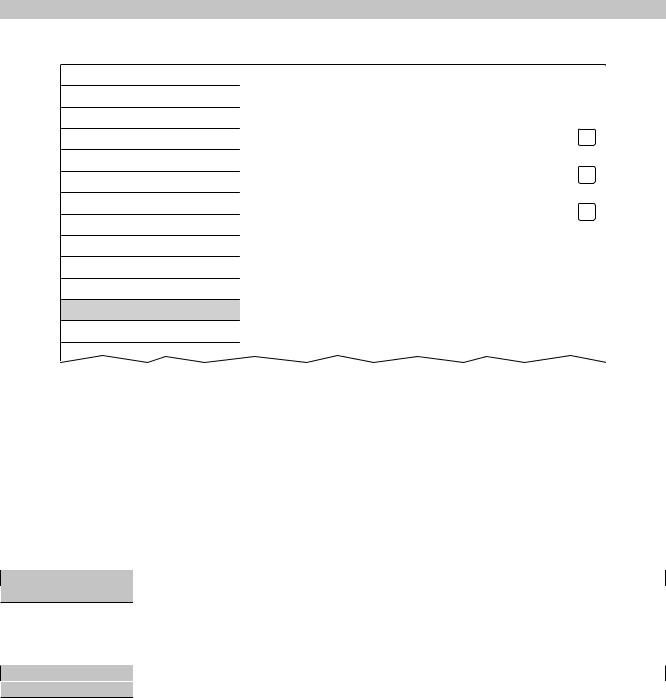
On this service page, individual parts or the entire system can be backed up or restored. A factory reset is also possible:
Startup |
Backup settings |
|
|
||
Network |
Press to backup settings to USB flash drive |
|
|
|
|
Time |
Backup boot logo / animation |
|
|
Press to backup boot logo / animation to USB flash drive |
|
Screen |
||
|
||
|
Backup system |
|
Audio |
||
|
Press to backup system to USB flash drive |
|
Gesture |
Complete backup |
|
|
||
VNC |
||
Press to backup settings, boot logo / animation and system to USB flash drive |
||
Web |
Reset settings |
|
|
||
Storage |
Press to restore factory settings |
|
|
|
|
Update |
Reset boot logo / animation |
|
|
Press to restore factory boot logo / animation |
|
Backup & Reset |
||
|
||
|
|
Information:
Only settings that have already been saved using a function on service page Save & Exit are included when creating a backed up. Settings and service pages that have not been saved are not backed up.
Backup settings (Button)
Accessing this function creates a backup of the settings and stores it on the USB flash drive.
Backup boot logo / animation (Button)
Accessing this function creates a backup of the boot - logo and stores it on the USB flash drive.
Backup system (Button)
Accessing this function creates a backup of the PPT system (unsigned PPT image) and stores it on the USB flash drive.
Information:
Creating a backup can take several minutes.
Complete backup (Button)
Accessing this function creates a full backup of the system, its settings and boot logo and stores it on the USB flash drive. The PPT image is saved without a signature.
Information:
Creating a backup can take several minutes.
Reset settings (Button)
Accessing this function loads the factory default settings.
Information:
The settings made on the service pages are not saved and will be lost.
Reset boot logo / animation (Button)
Accessing this function resets the boot logo and the boot animation to the factory default settings (summary screen).
68 |
Power Panel T50 User's manual V1.22 - Translation of the original documentation |
5.1.13 Service page Security
Startup
Network
Time
Screen
Audio
Gesture
VNC
Web
Storage
Update
Backup & Reset
Security
OPC UA
Save & Exit
Configuration • Service pages
Service password |
●●●●●●●● |
|
Password for setup changes |
|
|
max. 100 characters |
|
|
Show password |
|
|
Encrypt password |
||
Save security password encrypted |
|
|
Allow untrusted images
Enable installation of unsigned images! (volatile setting)
Service password
Default setting: EMPTY (no password entered) Entry range: Max. 100 characters
The service password is used to control access to the service pages (see "Entering the service password" on page 45).
The password is stored in configuration file PPT50Config.xml on the device.
Show password
Default setting: Disabled
Enabled |
The password is shown in the entry field as plain text. |
Disabled |
The password is hidden in the entry field using placeholder characters (●●●●●●). |
Encrypt password
Default setting: Enabled
Enabled |
The password is stored on the device in encrypted form. |
Disabled |
The password is stored on the device as plain text. |
Allow untrusted images
Default setting: Disabled
Disabled |
Only signed images can be installed on the device. |
Enabled |
If this option is enabled, an unsigned image can be installed (see service page "Update" on page 64). |
|
This option is not saved in the system settings and is immediately disabled after exiting the service |
|
pages. |
This function is necessary to install a system backup created earlier on the device, for example (backups are generally saved without a signature).
Power Panel T50 User's manual V1.22 - Translation of the original documentation |
69 |

Configuration • Service pages
5.1.14 Service page OPC UA
The OPC UA server can be enabled/disabled on this service page:
Startup |
OPC UA server |
|
|
||
Network |
|
|
|
|
|
Time |
Port |
|
|
OPC UA server port |
|
Screen |
||
|
||
|
Identify token |
|
Audio |
||
|
Choose the identify token type |
|
Gesture |
|
|
|
|
|
VNC |
|
|
|
|
|
Web |
|
|
|
|
|
Storage |
|
|
|
|
|
Update |
|
|
|
|
|
Backup & Reset |
|
|
|
|
|
Security |
|
|
|
|
|
OPC UA |
|
|
Save & Exit |
|
|
|
|
|
About & Info |
|
|
|
|
4840
Anonymous 

OPC UA server
Default setting: Disabled
If the setting is enabled, options Port and Identify token are available.
Either the hostname specified on service page Network or the IP address entered there must be used as the address for the OPC UA server.
Important!
The OPC UA server is stopped while the Power Panel service page is active.
Port
Default setting: 4840
The port number used to reach the OPC UA server of the Power Panel is specified here.
Identify token
Default setting: Anonymous
The following selections are available for option Identify token:
Anonymous |
The OPC UA server can be accessed within the network without authentication. |
Username |
The OPC UA server can only be reached within the network by specifying the username and pass- |
|
word. |
Additional input fields are displayed if option Username is selected:
Audio |
Identify token |
Username |
|
|
Choose the identify token type |
||
Hand button |
User |
|
|
|
|
||
VNC |
|
||
|
|
||
|
|
|
|
Web |
Password |
●●●●●●●● |
|
|
|||
Storage |
OPC UA server password |
||
|
|||
|
max. 100 characters |
|
|
Update |
Show password |
|
|
|
|
||
Backup & Reset |
|
||
|
|
||
|
|
|
70 |
Power Panel T50 User's manual V1.22 - Translation of the original documentation |